Create from a prompt or edit your own images with Google's Nano Banana 2.1. Describe a scene, change a background, or explore a new style in one workspace.
Studio preview. Generation and editing are coming soon.
Access & limits
Image generation and editing are coming soon.
Up to 3 JPG, PNG or WebP references · 5 MB each · 14 MB total.
Selected references and your draft stay in this page session. Refreshing or leaving clears them. Read the FAQ
EVERYDAY USE CASES
Image generation & editing examples
Photos & design
Refresh a product photo, update a profile picture, explore a room makeover, or design your next promotion.
Before ReferenceAfterEdited example
PRODUCT PHOTOGRAPHY
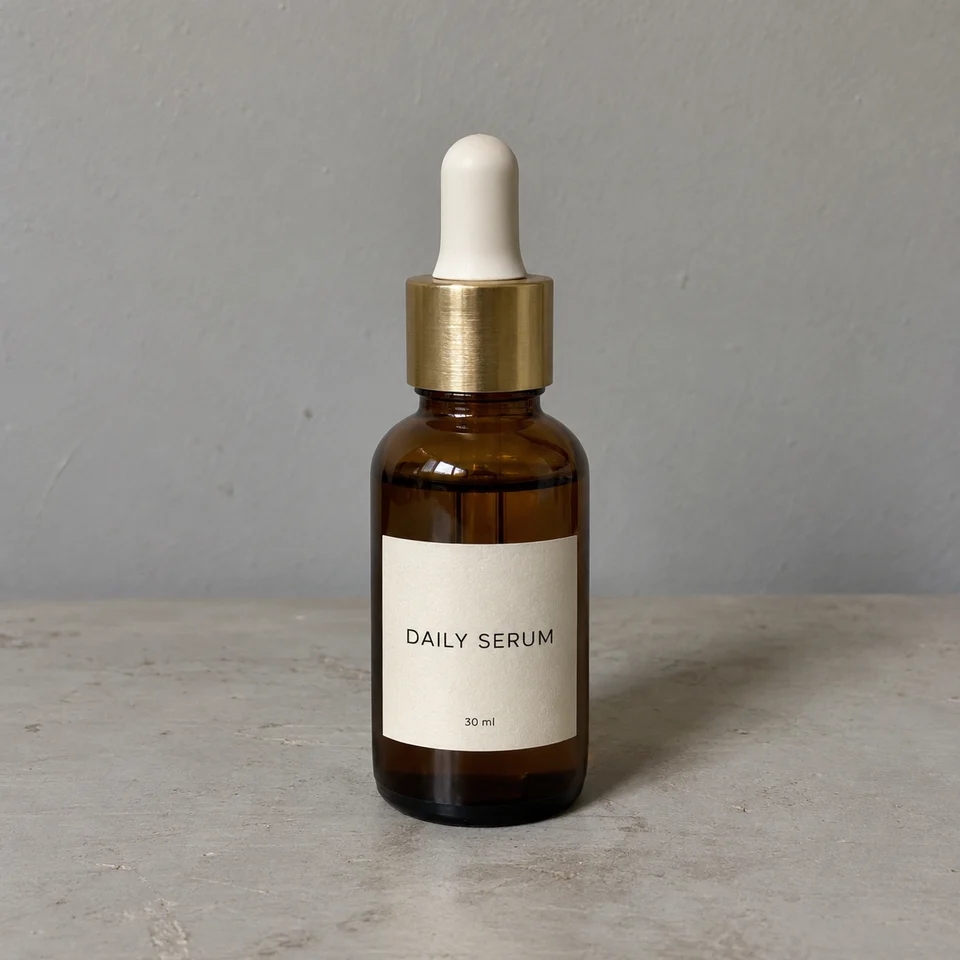
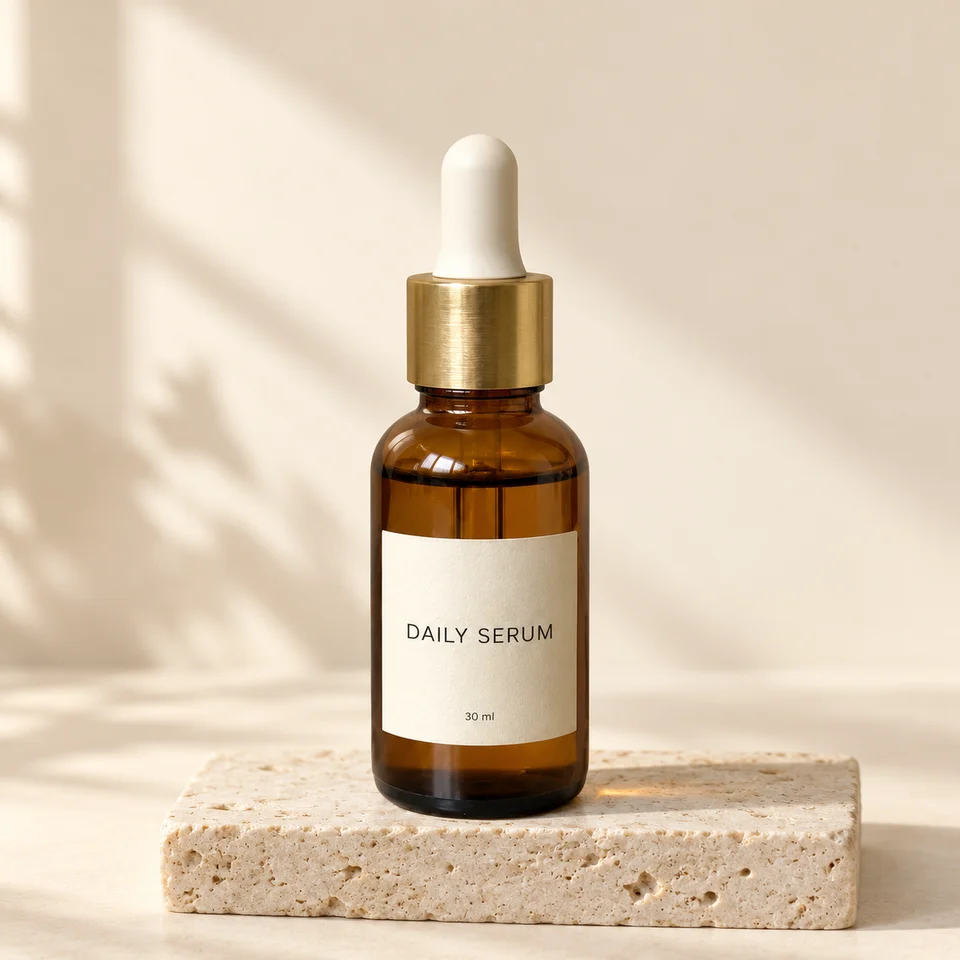
A product photo ready for your store.
Turn an ordinary product shot into a clean display image with a new backdrop and better light.
View prompt & setup
Edit the supplied product photo into a polished ecommerce lifestyle photograph. Preserve the exact amber bottle, cap, gold collar, label text, proportions, and visible angle. Replace the gray table and wall with a warm ivory studio backdrop and a small pale travertine display block. Add soft side daylight, realistic glass highlights, and a grounded shadow. Keep one centered bottle, fully visible, with generous space around it. No extra products, props, new label text, logos, or watermark. Square 1:1 photograph.
Sample: 1254 × 1254 px
Suggested studio settings
Image editing1K1:11 reference
Before ReferenceAfterEdited example
PROFESSIONAL HEADSHOTS
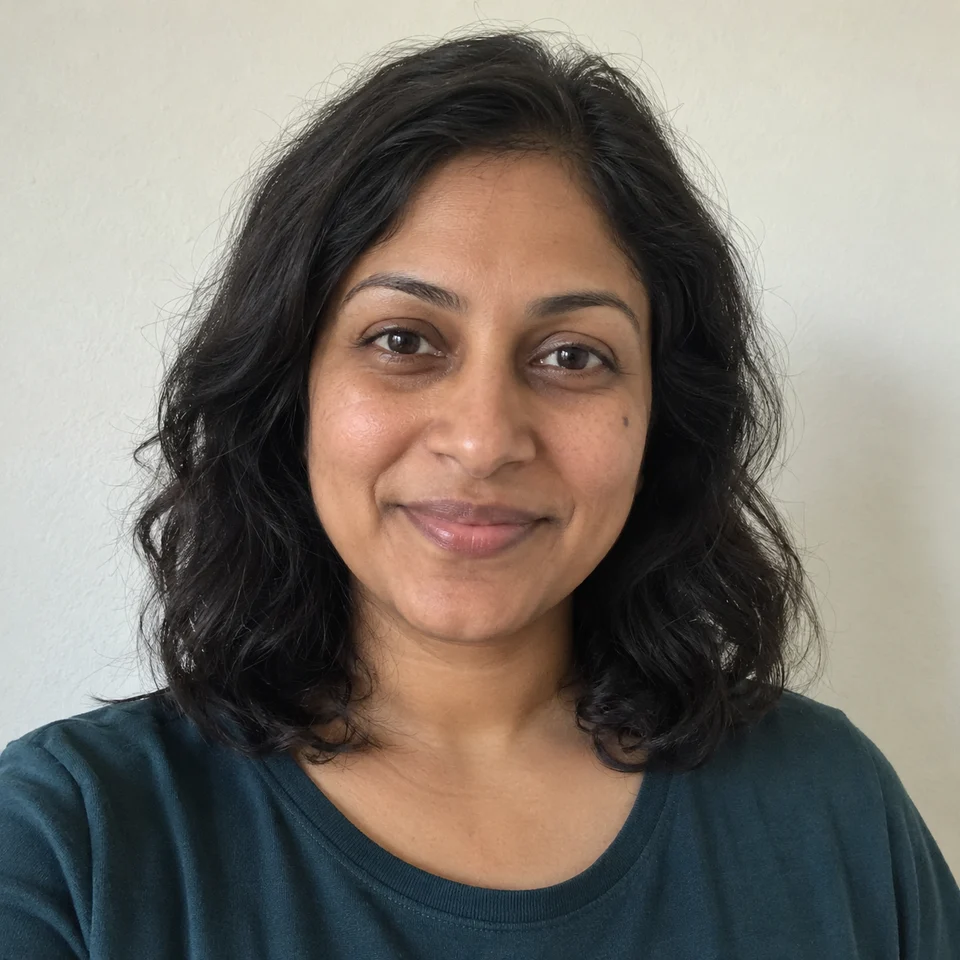
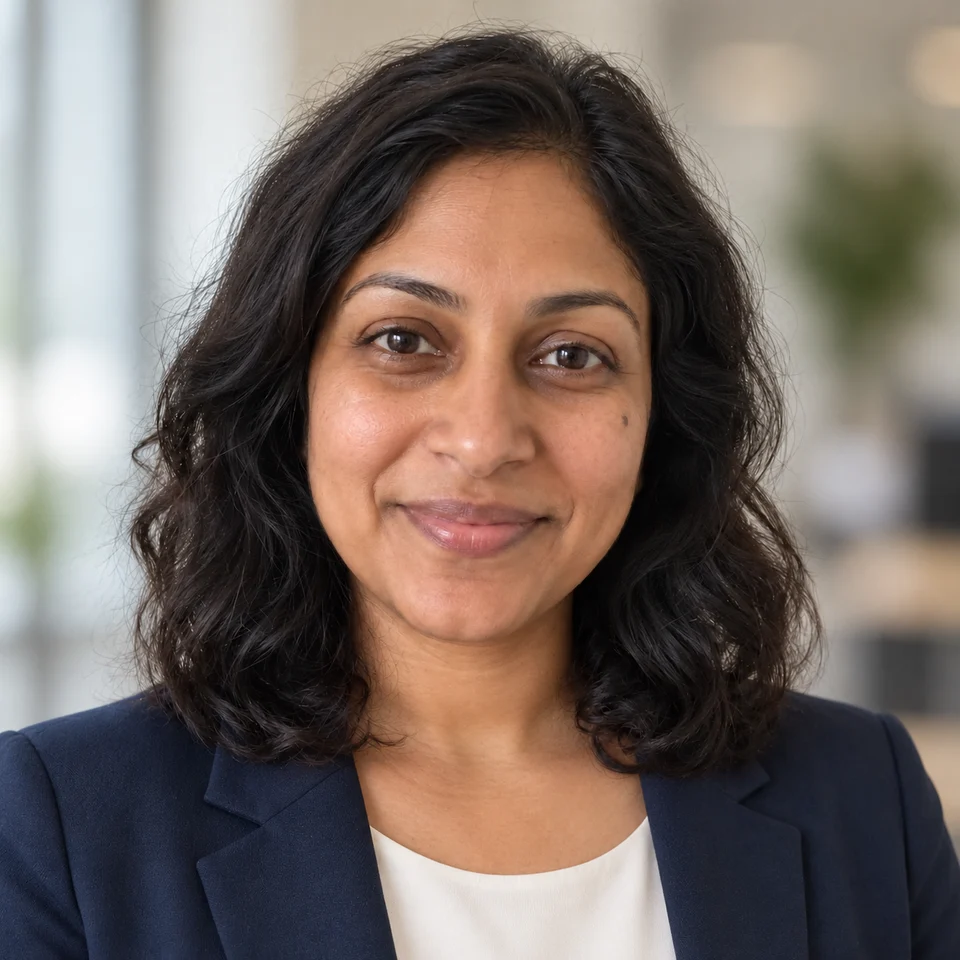
A fresh headshot for your profile.
Update the outfit, background, and lighting of a casual portrait for a work profile or personal website.
View prompt & setup
Turn this reference portrait into a natural professional profile headshot. Preserve the same person's face, age, skin tone, brown eyes, wavy hair, small cheek beauty mark, expression, and head-and-shoulders framing. Change the T-shirt to a navy blazer over an ivory top and replace the wall with a softly blurred neutral office background. Use flattering soft window light while keeping pores and smile lines. Do not reshape the face, retouch away the beauty mark, add makeup, or make the skin plastic. Square 1:1, photorealistic, no text or watermark.
Sample: 1254 × 1254 px
Suggested studio settings
Image editing1K1:11 reference
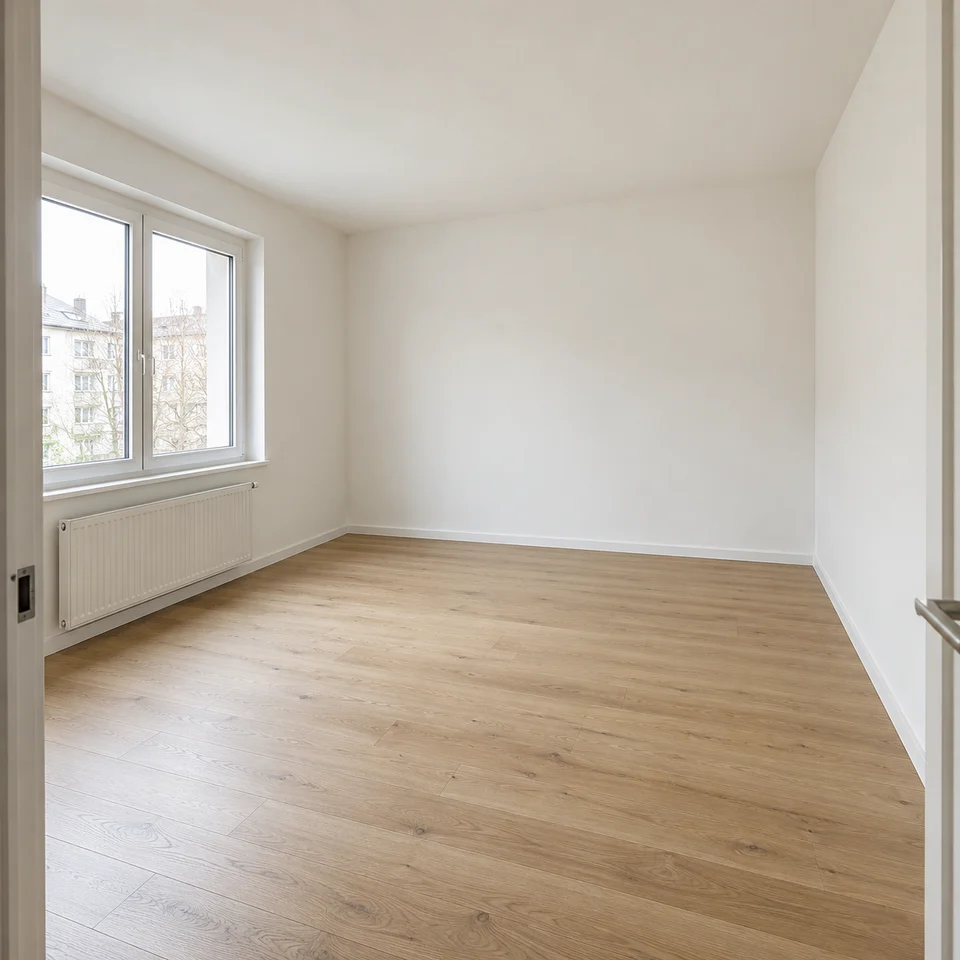
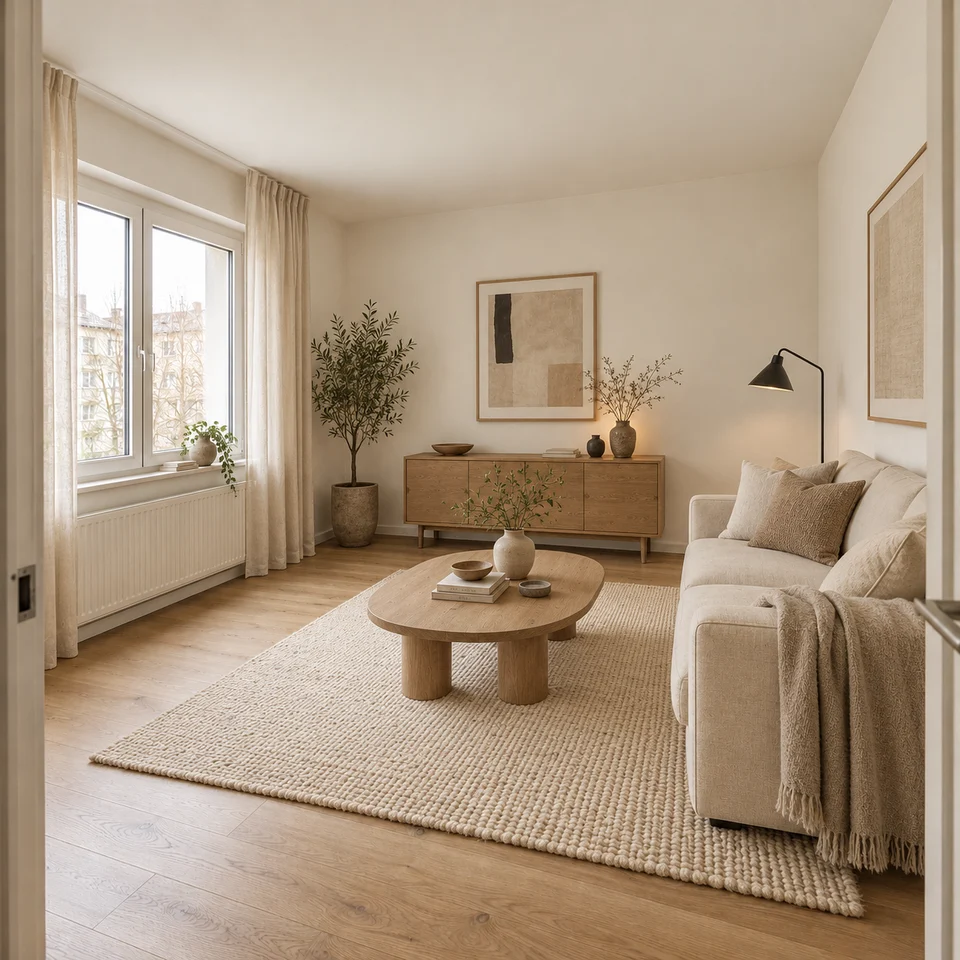
Before ReferenceAfterEdited example
INTERIOR DESIGN
See your room before you redecorate.
Explore furniture, textures, and a new style in an existing room before choosing what to buy.
View prompt & setup
Restyle this exact empty living room as a warm, realistic Japandi interior. Keep the camera viewpoint, wall layout, left window and radiator, oak floor, room dimensions, and architectural lines unchanged. Add a cream two-seat sofa along the right wall, a low oval oak coffee table on a textured ivory rug, a black reading lamp beside the sofa, light linen curtains framing the window without covering the radiator, and a small plant in the rear-left corner. Use restrained, lived-in styling and the same soft window daylight. Furniture must fit the room at realistic scale. This is a design concept, not construction. Square 1:1, no people, text, extra windows, doors, or watermark.
Sample: 1254 × 1254 px
Suggested studio settings
Image editing2K1:11 reference
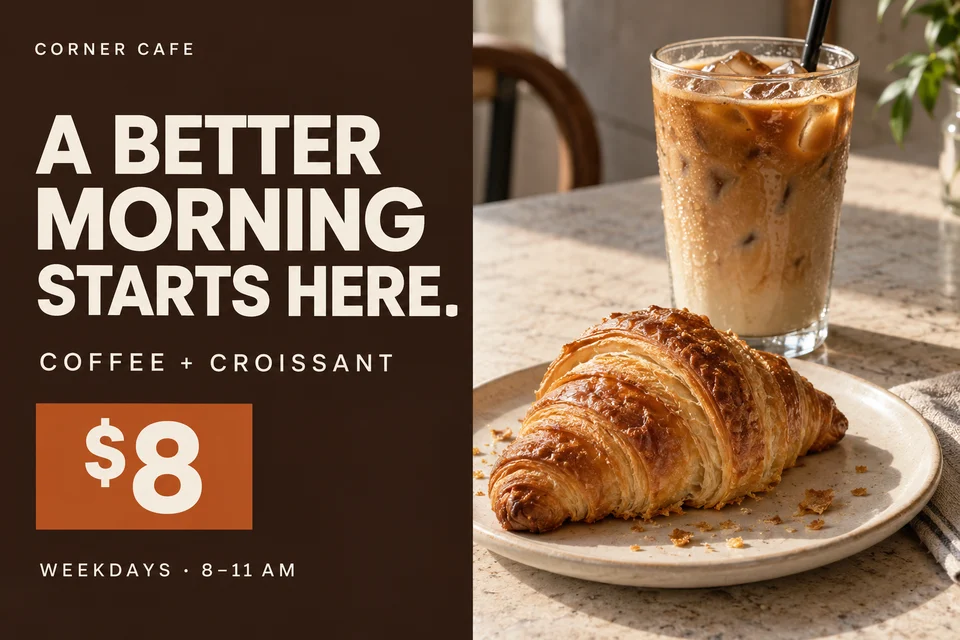
Campaign conceptText to image
SOCIAL MEDIA ADS
Give your next promotion a clear visual.
Combine an appetizing product photo, a readable headline, and a simple offer for your next campaign.
View prompt & setup
Use case: ads-marketing.
Asset type: polished landscape 3:2 social media campaign concept for a small independent cafe.
Primary request: Design a sophisticated, usable cafe breakfast promotion with a real photographic hero, not a generic AI flyer. One beautifully photographed iced latte in a clear tumbler and one flaky golden croissant on an ivory ceramic plate. Crumbs and real laminated pastry texture, authentic condensation on the glass, believable proportions, soft directional natural light. The hero photo occupies the RIGHT half against a warm light stone cafe table; the LEFT half is deep espresso brown with spare clean ivory typography. Bold modern sans-serif headline with elegant optical spacing and no outlines. A restrained burnt orange rectangle holds the offer price. Flat finished graphic, front-on, not a poster photographed on a wall.
Text, all verbatim and no other words:
Small brand at upper left: "CORNER CAFE"
Large headline, three lines: "A BETTER" / "MORNING" / "STARTS HERE."
Medium subheading: "COFFEE + CROISSANT"
Offer price: "$8"
Small final line: "WEEKDAYS · 8–11 AM"
Composition: clear readable hierarchy, generous spacing, all essential copy within 8% safe margins, balanced editorial layout, the food appetizing and physically plausible, no fussy ornaments.
Constraints: no invented extra copy, no watermark, no fake QR codes, no clip art, no cartoony food, no gradient glow, no floating ingredients, no medieval or marker fonts, no before/after collage.
Sample: 1536 × 1024 px
Suggested studio settings
Text to image2K3:2
These examples show possible creative directions. Results vary with your photo and prompt; review faces, product details, room layouts, and wording before use.
MODEL & STUDIO
What is Nano Banana 2.1?
Nano Banana 2.1 is Google’s Gemini model for generating and editing images. It updates Nano Banana 2 with improvements to visual quality, prompt adherence, character consistency, and text rendering. Nano Banana Pro is the premium option for more complex image work.
BananaNano Art is an independent image studio for generation and editing at 1K, 2K, or 4K, with monthly and annual subscriptions and one-time Credit packs. Prepare prompts and references here; the studio and purchase buttons show current availability.
Generation, editing, subscriptions, and Credit packs are subject to the current studio and purchase-button status. Access may be temporarily paused. See our launch prices and Credit rules. Google and email-code sign-in are available. New accounts start with zero Credits; there is no free generation trial.
Official model
Nano Banana 2.1 gemini-nano-banana-2.1
Image workflows
Text to image and reference-image editing, with one image per request.
Output controls
Choose 1K, 2K, or 4K when enabled in the studio. Default: 1K at 1:1.
Up to 3 JPG, PNG, or WebP files. 5 MB per file, 14 MB combined. These are this site’s limits.
Content privacy
Unsubmitted prompts and selected images stay in your browser. Submitted prompts are screened through Waffo Pancake; only permitted prompts and references are sent to Google for generation.
Saved history
Submitted jobs appear in your private account history. Images are retained for up to 30 days or until deleted. Unsubmitted drafts stay on this device.
Internal model verification · 4 recorded checks
We completed the four historical local Gemini API checks below. Each row records one successful request, not an average or a delivery-time guarantee. Dates use Asia/Shanghai time. The gallery illustrations are separate from these checks.
Text to image · 1K · 1:1
1024 × 1024 px15.27 seconds · successful response
Reference-image edit · 1K · 1:1
1024 × 1024 px15.34 seconds · successful response
Text to image · 2K · 16:9
2752 × 1536 px39.13 seconds · successful response
Text to image · 4K · 4:5
3712 × 4608 px60.41 seconds · successful response
These records do not confirm billing totals, multiple-reference reliability, or resource usage on deployed Cloudflare Functions.
Change one thing at a time. Write what should change and what should stay. This helps you prepare a focused editing prompt.
PROMPT LIBRARY
Nano Banana 2.1 prompt ideas
Practical prompts
Copy a prompt or load its suggested studio setup. Editing templates include the reference image; replace it with your own photo and customize the instructions.
PRODUCT PHOTOGRAPHY
Style an ecommerce product photo
Suggested: 1K · 1:1Includes reference
Edit the supplied product photo into a polished ecommerce lifestyle photograph. Preserve the exact amber bottle, cap, gold collar, label text, proportions, and visible angle. Replace the gray table and wall with a warm ivory studio backdrop and a small pale travertine display block. Add soft side daylight, realistic glass highlights, and a grounded shadow. Keep one centered bottle, fully visible, with generous space around it. No extra products, props, new label text, logos, or watermark. Square 1:1 photograph.
PROFESSIONAL HEADSHOTS
Refresh a professional headshot
Suggested: 1K · 1:1Includes reference
Turn this reference portrait into a natural professional profile headshot. Preserve the same person's face, age, skin tone, brown eyes, wavy hair, small cheek beauty mark, expression, and head-and-shoulders framing. Change the T-shirt to a navy blazer over an ivory top and replace the wall with a softly blurred neutral office background. Use flattering soft window light while keeping pores and smile lines. Do not reshape the face, retouch away the beauty mark, add makeup, or make the skin plastic. Square 1:1, photorealistic, no text or watermark.
INTERIOR DESIGN
Preview a room makeover
Suggested: 2K · 1:1Includes reference
Restyle this exact empty living room as a warm, realistic Japandi interior. Keep the camera viewpoint, wall layout, left window and radiator, oak floor, room dimensions, and architectural lines unchanged. Add a cream two-seat sofa along the right wall, a low oval oak coffee table on a textured ivory rug, a black reading lamp beside the sofa, light linen curtains framing the window without covering the radiator, and a small plant in the rear-left corner. Use restrained, lived-in styling and the same soft window daylight. Furniture must fit the room at realistic scale. This is a design concept, not construction. Square 1:1, no people, text, extra windows, doors, or watermark.
SOCIAL MEDIA ADS
Design a cafe promotion
Suggested: 2K · 3:2Text to image
Use case: ads-marketing.
Asset type: polished landscape 3:2 social media campaign concept for a small independent cafe.
Primary request: Design a sophisticated, usable cafe breakfast promotion with a real photographic hero, not a generic AI flyer. One beautifully photographed iced latte in a clear tumbler and one flaky golden croissant on an ivory ceramic plate. Crumbs and real laminated pastry texture, authentic condensation on the glass, believable proportions, soft directional natural light. The hero photo occupies the RIGHT half against a warm light stone cafe table; the LEFT half is deep espresso brown with spare clean ivory typography. Bold modern sans-serif headline with elegant optical spacing and no outlines. A restrained burnt orange rectangle holds the offer price. Flat finished graphic, front-on, not a poster photographed on a wall.
Text, all verbatim and no other words:
Small brand at upper left: "CORNER CAFE"
Large headline, three lines: "A BETTER" / "MORNING" / "STARTS HERE."
Medium subheading: "COFFEE + CROISSANT"
Offer price: "$8"
Small final line: "WEEKDAYS · 8–11 AM"
Composition: clear readable hierarchy, generous spacing, all essential copy within 8% safe margins, balanced editorial layout, the food appetizing and physically plausible, no fussy ornaments.
Constraints: no invented extra copy, no watermark, no fake QR codes, no clip art, no cartoony food, no gradient glow, no floating ingredients, no medieval or marker fonts, no before/after collage.
QUICK START
How to use the image studio
01
Describe or upload
Write a prompt, or upload up to three reference images. For an edit, describe what should change and what should stay.
02
Choose output settings
Choose from 14 aspect ratios and the available 1K, 2K, or 4K resolution. Adapt a template to your subject and instructions.
03
Sign in and generate
When the tool is enabled, sign in and submit with enough Credits. Each image uses 10 Credits at 1K, 20 at 2K, or 40 at 4K. Check the purchase buttons for available subscriptions and Credit packs, and download delivered images from your private history.
GOOD TO KNOW
Nano Banana 2.1 FAQ
Create and edit up to 4K with subscriptions or Credit packs. Check the tool and purchase buttons for current availability.
Nano Banana 2.1 is Google’s Gemini image generation and editing model, and an update to Nano Banana 2. BananaNano Art is an independent image studio built around it, with no affiliation to Google. See Google’s 2.1 model documentation.
Can I generate images now?
The studio supports 1K, 2K, and 4K generation and editing, with monthly and annual subscriptions and one-time Credit packs. The studio and purchase buttons show current availability; access may be paused. Browsing examples, copying prompts, and preparing a draft are free. New accounts start with zero Credits and have no free generation trial. See our prices and Credit rules.
How do I edit an image?
Choose Image to Image, select references, and describe what to change or keep. Preparing a draft does not send a model request. This site accepts up to 3 JPG, PNG, or WebP images, with a maximum of 5 MB each and 14 MB combined. When the tool is enabled, choose an available resolution and submit an edit with sufficient Credits. A delivered result can be used as a reference for a further edit, charged separately.
Which sizes and aspect ratios can I use?
Choose 1K, 2K, or 4K output with 14 framing options: 1:1, 4:5, 3:4, 2:3, 9:16, 1:4, 1:8, 5:4, 4:3, 3:2, 16:9, 21:9, 4:1, 8:1. The default is 1K at 1:1, with one image per request. Pixel dimensions depend on the aspect ratio. Templates include suggested settings; select an available resolution before submitting.
How long does a generation take?
Timing depends on the prompt, references, and service load. Our four recorded local checks took 15.27–60.41 seconds. That small sample is not a promised wait time or an average. Check the tool for current availability.
What if a request fails or is refused?
A technical failure, model refusal, or missing image releases the task’s reserved Credits. The studio does not automatically repeat a model call. If your connection is interrupted, check the original task in your account; retrying the same submission identifier does not create a second job. Choosing a new generation or edit uses Credits again.
Are my images saved when I leave?
Selected references and your unsubmitted draft stay in this page session. A temporary local sign-in draft restores your setup on return and expires after one hour. Submitted jobs and results appear in your private account history; images are available for up to 30 days or until you delete them. Download work you want to keep. Unsubmitted browser drafts cannot be recovered from the server.
How do I report harmful content or appeal a restriction?
Unsubmitted prompts and selected images stay in your browser. On submission, the text prompt is screened through Waffo Pancake. Only a valid decision allowing the prompt permits the prompt and references to be sent to Google’s Gemini API. Submitted images are stored privately in Cloudflare R2 for up to 30 days. Provider processing and retention rules apply. See our Privacy Policy for details.
Can I use the output commercially?
We do not claim ownership of your inputs or results. You are responsible for having the necessary rights to uploaded material and for checking your intended use. AI output is not guaranteed to be unique or cleared of third-party rights. Review our content terms and Google’s generated-content terms.
Will it preserve every detail or render text perfectly?
Results can vary. References and clear instructions help guide the model, but faces, product details, layout, and text may change. Check spelling and visual details before publishing. For finer control, make one change at a time and review each result.
EXPLORE YOUR NEXT IDEA
Create your next image
Prepare a prompt or an edit. Choose an available resolution up to 4K in the studio.